Published enhancement previews
DLSS5 Enhance
Cloud batch enhancement with an account and credits. Character styling is available online; Windows support is planned. No local RTX needed.
Download Windows x64 · v0.1.1Download .dmg — macOS IntelDLSS5NVIDIA · independent guide
Download the Windows or macOS preview, try game-character style conversion in your browser, or apply for the Windows RTX Studio beta.
Choose your download or trial
Published enhancement previews
Cloud batch enhancement with an account and credits. Character styling is available online; Windows support is planned. No local RTX needed.
Download Windows x64 · v0.1.1Download .dmg — macOS IntelOnline · No installation
Run a supplied example on phone or desktop without signing in. Your own uploads require an account.
Try the free online sampleWindows RTX · Private beta
A separate local Studio workflow. Apply after signing in; access is sent by email. No public local Studio installer.
Apply for the Windows betaThese are independent tools, not NVIDIA drivers or a game runtime. No Android APK is provided here. Why there is no APK →
Download the recipe kit (35 KB ZIP)Download the DLSS5 Enhance Windows x64 or macOS Intel preview directly, try game-character style conversion in a mobile or desktop browser, or apply for the separate Windows RTX Studio beta.
NVIDIA does not distribute DLSS 5 as an Android APK. This site provides no DLSS 5 APK or standalone runtime installer; files circulating as “DLSS 5 APK” are not NVIDIA releases.
Android and other phone users can run the free browser image example without signing in, with no APK installation. Windows users can submit a Studio request on this page for manual review and an email reply. This is a request for our independent software, not a download of NVIDIA’s game runtime.
General risk notice: third-party downloads may include bundled content or trigger game anti-cheat systems; use your own judgment.
Technology scope: NVIDIA DLSS · Checked 2026-10-26.
DLSS5 Enhance is our own desktop window: drop a folder of images on it, run the batch through the same account and the same model, watch each row, and open the before/after compare when it finishes. It is not NVIDIA DLSS 5, installs and replaces no NVIDIA file, and is neither an APK nor a game runtime.
Windows v0.1.1 currently provides batch cloud image enhancement. Game-character style conversion for Windows is planned and has not shipped; try it online today. The planned flow is to choose a character image and one of five styles, confirm the credit cost, generate, compare and save. Try character styling online · Windows development specification · Style and API catalog (JSON)
Unsigned previews are available for Windows x64 (v0.1.1) and macOS Intel (v0.1.0). This cloud client needs no local RTX or WSL and is separate from the local RTX Studio beta below. macOS may require approval under System Settings → Privacy & Security on first launch.
It needs a signed-in account and spends credits per task (one credit per task); the window shows the balance. On one run on our own machine: 1440×778 in → 1536×832 WebP out, 207,666 bytes, 14 seconds, credits 10 → 9. That is a single recorded run, not a benchmark, and not a prediction for your machine or your images.
Checked 2026-11-02.
For supported in-game use, NVIDIA’s September 3, 2026 release documents DLSS 5 in NBA 2K27 on GeForce RTX 50 Series GPUs, with Game Ready Driver 616.64. Use NVIDIA’s app or driver website for its driver downloads; developer plugins are separate integration resources, not a universal consumer installer. Our downloadable recipe and review kit is independent reference material, not a driver, game runtime or Studio installer.
Sources: NVIDIA — NBA 2K27 / DLSS 5 (2026-09-03) · NVIDIA Developer — DLSS · Checked:
For the NBA 2K27 configuration documented by NVIDIA, obtain the appropriate Game Ready driver through the NVIDIA app or NVIDIA’s driver website, then open the game and enable “DLSS Neural Rendering” in Video Settings. Follow NVIDIA’s current requirements and the game’s updates; this is not a procedure for every game or GPU. Our review kit needs no installation. Third-party programs are separate, untested projects here; this page provides no DLL replacement or injection instructions.
Sources: NVIDIA — NBA 2K27 / DLSS 5 (2026-09-03) · NVIDIA Developer — DLSS · Checked:
Yes, NVIDIA’s September 3, 2026 announcement confirms DLSS 5 in NBA 2K27 on GeForce RTX 50 Series GPUs. That is a documented release, not proof of support for every title or older RTX card; check the specific game’s release notes. Our DLSS5 Studio is a separate, independent Windows RTX style-conversion and neural-render redraw tool: sign in and use the request form below to apply for access. A request does not guarantee access or a delivery date. We provide no public Studio installer or Android APK; the browser example is a separate workflow, not NVIDIA DLSS running in a phone game.
Sources: NVIDIA — NBA 2K27 / DLSS 5 (2026-09-03) · NVIDIA Developer — DLSS · Checked:
Independent game-character redraw review checklists, a planning matrix and a blank decision record; not a game runtime and no installation required.
Compiled from our published review checklist, five-direction planning matrix and acceptance steps. It is not an APK, contains no NVIDIA binaries or DLLs, and is not the Studio application.
v2 adds the exact fixed prompts from three public style samples, a five-direction brief template with unverified effects, and a local image-metadata script. See the prompt catalog for its relationship to the article tasks; generation results are not guaranteed.
Optional local review: with Node.js 18 or later, place two images beside the extracted tools/review-pair.mjs and run from that directory. The script has no dependencies, uploads nothing, and gives no quality or similarity verdict.
node review-pair.mjs source.jpg result.webpREADME.mdaccept-reject-record.csvchecklists/core-game-character-style-matrix.en.mdchecklists/core-game-character-style-matrix.zh.mdchecklists/core-game-frame-style-reference.en.mdchecklists/core-game-frame-style-reference.zh.mdchecklists/core-redraw-review-checklist.en.mdchecklists/core-redraw-review-checklist.zh.mdprompts/README.mdprompts/catalog.jsonprompts/characterStyle.txtprompts/five-direction-brief-template.mdprompts/sample1.txtprompts/sample2.txttools/review-pair.mjsFile size: 35828 bytes
SHA-256: 58f760ae41de528784aecf17de20cbc666ed4223bbd182e4c11c8b891c4056cb
These are official channels for released components such as DLSS 4.5 and developer resources; a standalone consumer DLSS 5 download remains unconfirmed.
https://www.nvidia.com/en-us/software/nvidia-app/
Official NVIDIA app, including the documented DLSS 4.5 Super Resolution update path.
https://www.nvidia.com/en-us/geforce/news/dlss-4-5-super-resolution-available-now/
Official release notes for that update.
https://developer.nvidia.com/rtx/dlss
Developer integration resources, not a consumer installer.
A third-party GitHub repository.
Third-party / not provided by us / unverified: we have not tested this tool.
A third-party mirror page on SourceForge.
Third-party / not provided by us / unverified: we have not tested this tool.
A third-party distribution page on uptodown.
Third-party / not provided by us / unverified: we have not tested this tool.
A third-party modding-tool page on Nexus Mods.
Third-party / not provided by us / unverified: we have not tested this tool.
General risk notice: third-party downloads may include bundled content or trigger game anti-cheat systems; use your own judgment.
For licensing and safety reasons, this directory only links out: we do not host, mirror or redistribute any third-party binaries or NVIDIA DLLs, or endorse their functionality or safety.
| Item | Facts and limits |
|---|---|
| NVIDIA App | NVIDIA’s official app; the checked release documents the DLSS 4.5 Super Resolution update path. Official source |
| In-game DLSS updates | Support and updates can arrive through game patches; consult that game’s release notes for the version, rather than treating them as a universal installer. NVIDIA game-update example |
| Third-party dlss-5-swapper mirrors | Such mirror pages exist on SourceForge and uptodown. We do not provide or verify these third-party injection tools; we do not recommend or endorse them, or provide binaries or installation steps; directory links appear above. |
Last checked:
Searching for “DLSS 5 APK”, “DLSS 5 mobile download” or “DLSS 5 download Android” can mean different jobs. Here you can try a browser workflow or download our review materials; neither installs DLSS in a game. DLSS5 Studio has its own Windows request path. This is an independent site, not affiliated with NVIDIA.
| What you are looking for | What is available here |
|---|---|
| Android APK / app installer | Not provided by this site. The browser example does not require installing an APK. |
| Browser example | Try a supplied example, compare its image result, and sign in for your own upload. This is an independent image workflow, not NVIDIA DLSS. |
| Recipe and review ZIP | Reference materials and commands listed in the kit. Not an APK, driver, game patch or Windows Studio installer. |
| Windows Studio | A separate local-tool request path. Register or sign in to use the existing request form; receiving access is not automatic. |
Download the existing recipe and review kit (ZIP) · Read the Android / APK status guide
Use the game-character example for a style, lighting and material reference. For an image-enhancement example, use the separate visual enhancer. These supplied examples can be tried without signing in; your phone does not install a DLSS runtime.
Choose the example’s run action and wait for its result. If a limit or an error is shown, follow that message rather than assuming the task finished. A cached example illustrates the workflow; it is not a new run of your own picture.
Drag the input/output comparison and check faces, hands, text, object outlines and materials. The result can invent detail; keep the source. Use the result’s download link only when it is ready. An image download is not an Android app.
Your own upload uses the signed-in workspace. Read its file, credit and output limits before submitting. The browser service and the Windows tool are different processing paths; neither enables a DLSS feature inside a phone game.
Open the game-character browser exampleTry the separate visual enhancer example
Use the existing request area on this page, or sign in through the link below. The request email and form stay behind the account gate.
In the existing form, state your Windows version, RTX model, and whether you want to process images or video. Check the published system requirements below; do not infer compatibility from the browser example.
A received request is not a public installer or an immediate software download. If the form reports an error or unconfirmed delivery, use the guidance it shows. Follow the email reply for availability and compatibility; this guide adds no delivery date, price or support promise.
Sign in and return to the request areaRead the system requirements and boundaries
DLSS5 Studio is the desktop handover for our style-conversion and neural-render redraw workflow. Choose between requesting the Windows RTX build and trying a browser style-conversion example; neither path supplies an APK or a game injector.
| Device | Available path | Basis on this page |
|---|---|---|
| Windows + RTX | Request the independent Studio build after sign-in for the local image/video workflow. Meeting the hardware requirements is not an automatic invitation. | Existing page: Windows RTX tool available by request; signed-in request flow. |
| Android / iOS | No Studio APK or native mobile build is provided here. Try the browser example; this does not install the Studio desktop app. | Existing page: no Android APK; phone or desktop browser converter; Studio is a separate Windows tool. |
| Other systems / no RTX | The Studio desktop workflow is not available for these configurations. Browser examples are a separate path, not a desktop compatibility claim. | Existing page: Windows and NVIDIA RTX are desktop requirements. |
This site does not provide a DLSS 5 APK. DLSS5 Studio is an independent Windows RTX tool available by request after sign-in, not a public Android installer. Use the browser example instead of looking for an APK here.
The Studio desktop build does not run on Android. On an Android phone, you can try the browser example without installing Studio or an APK. The browser workflow is separate from the Windows RTX application and from the NVIDIA DLSS game runtime.
No. The cached browser example does not require a local RTX card. The RTX requirement on this page applies to the Windows Studio desktop workflow; it is not a requirement to view the browser example.
Last checked:
What it does
A local Windows interface for batch image and video processing through the Visual Enhancer release.
What you get
Wipe comparison, measured queue results and downloadable files that stay on your machine.
Limit
RTX hardware and the NVIDIA release package are required; Live is an enhanced preview, not real-time video.
There is no standalone Android APK for DLSS 5. Use the browser-based online converter on a phone or desktop; DLSS5 Studio is a separate Windows RTX tool available by request.
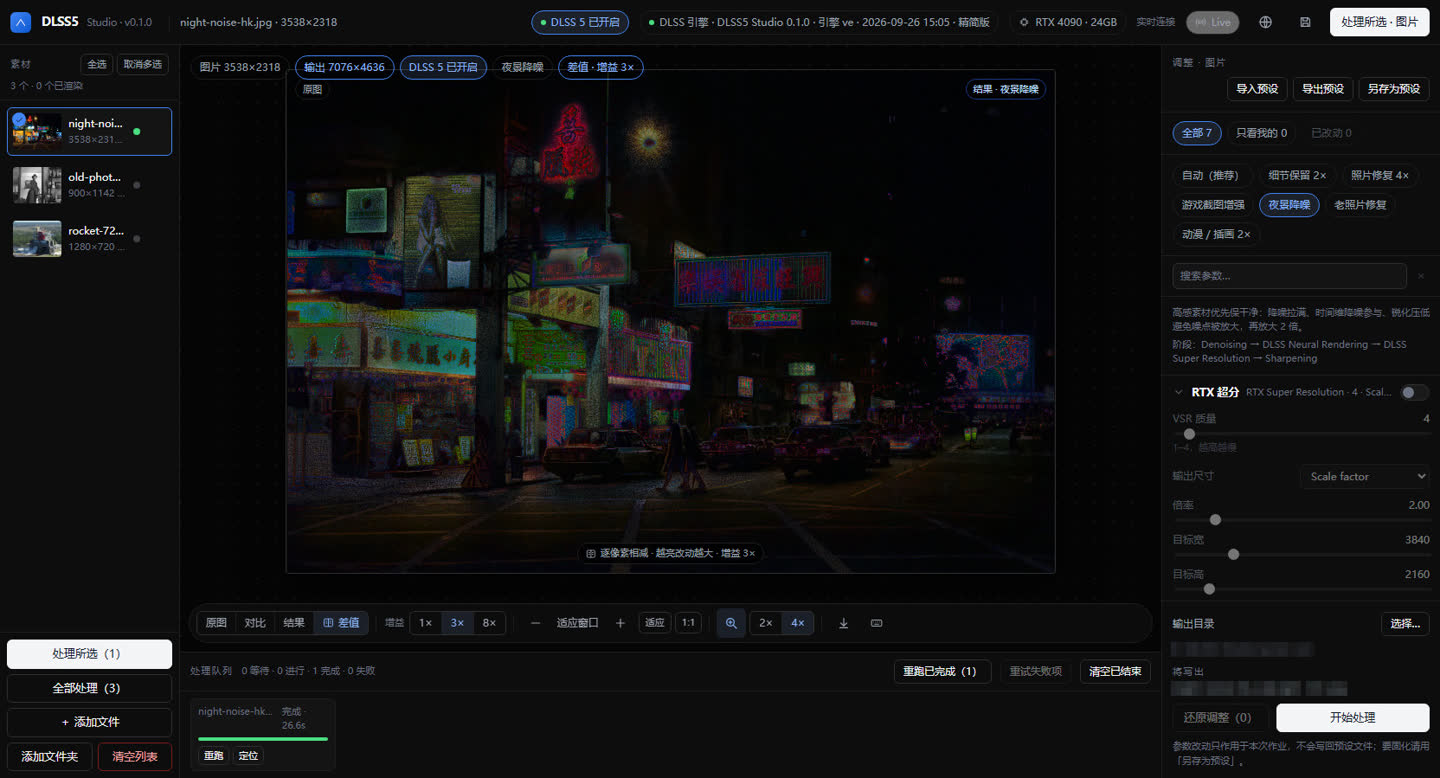
These are real application captures from Windows 11 Pro 26200 on an RTX 4090 24 GB with driver 591.86. The inputs are CC0 or public-domain source media; the Hong Kong night source, 1900 portrait source and NASA SLS video source are linked for verification.
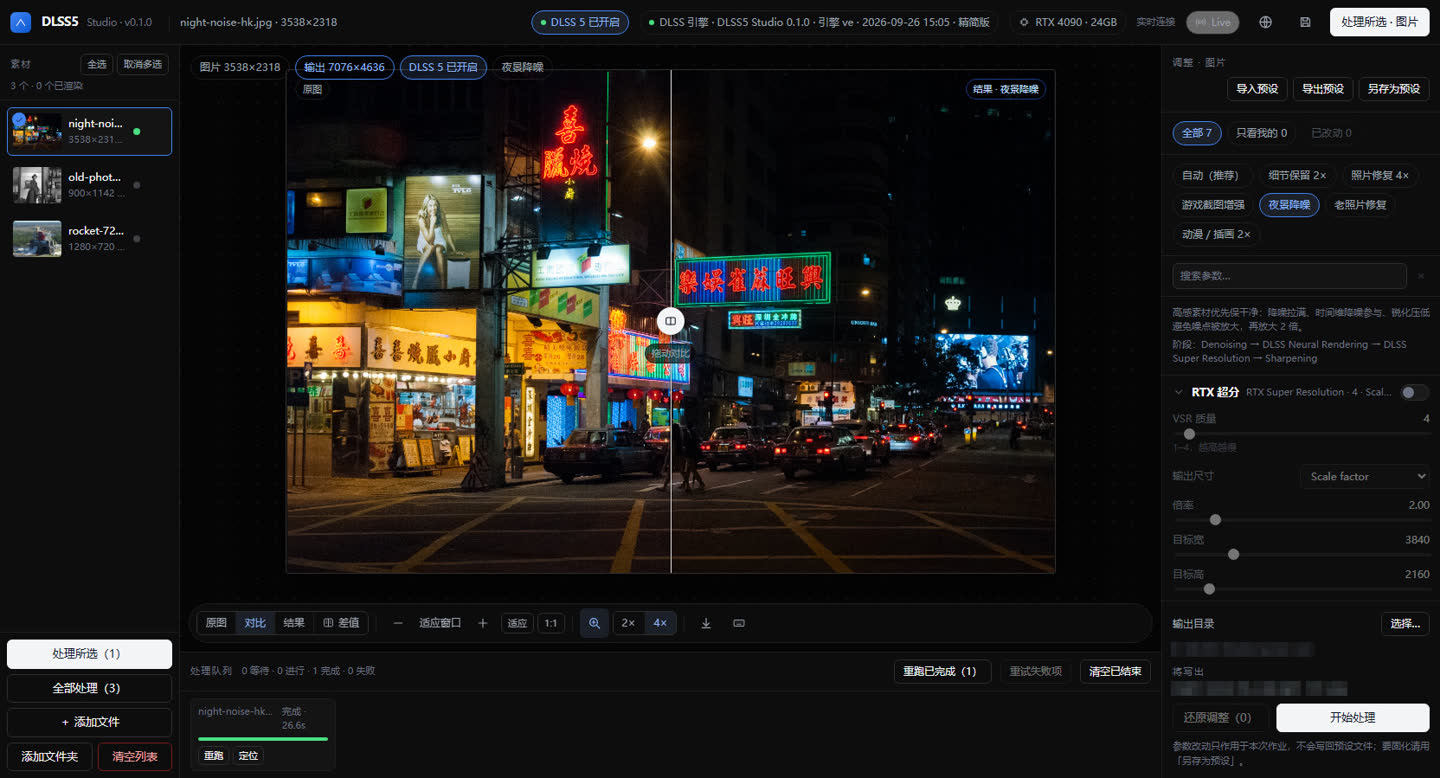
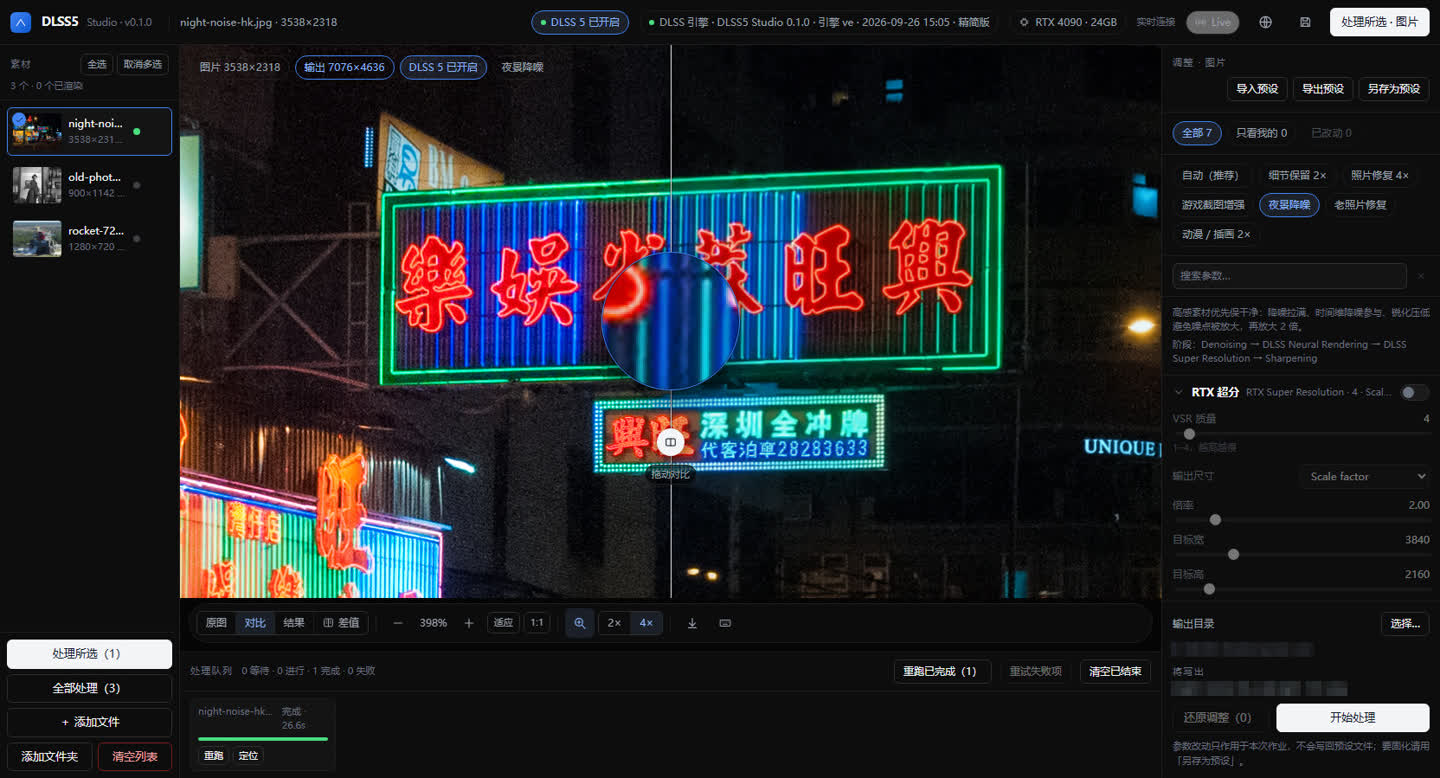
The Night Noise preset processed a 3538×2318 street frame into 7076×4636 in 26.6s. The screenshot shows the wipe comparison, DLSS 5 enabled, Night Noise selected and the completed queue item.
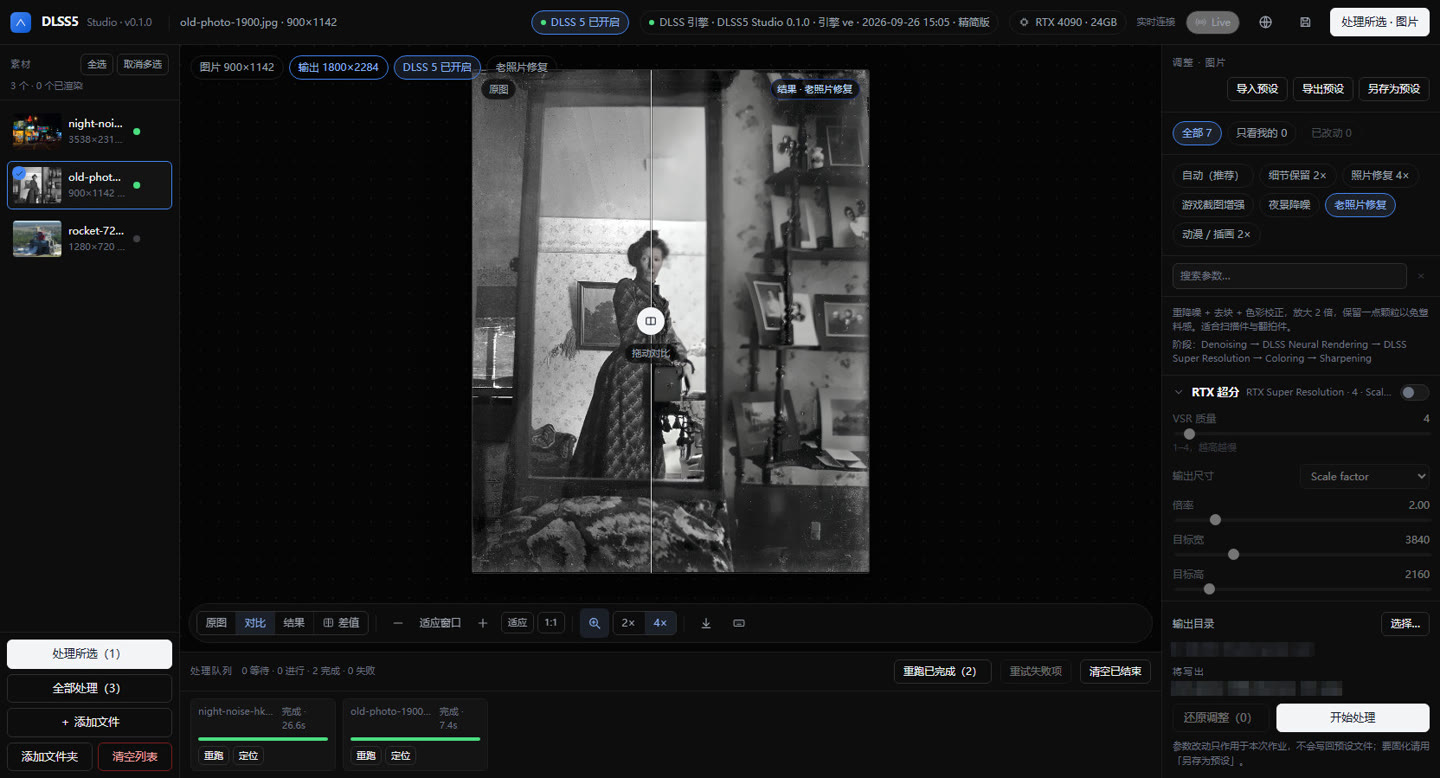
The Old Photo Restore preset took a 900×1142 public-domain scan to 1800×2284 in 7.4s. The before/after wipe is the application view; no hand retouching was added to the screenshot.
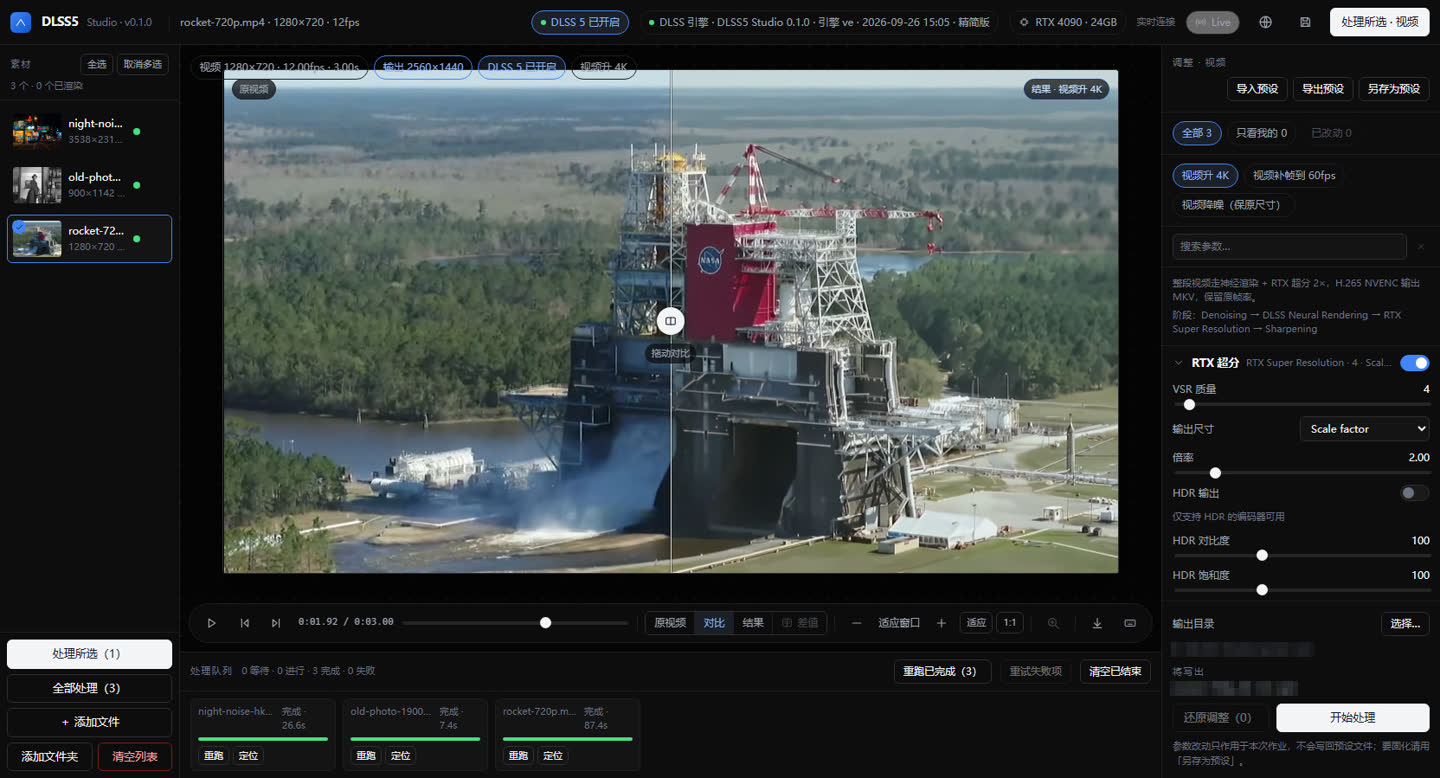
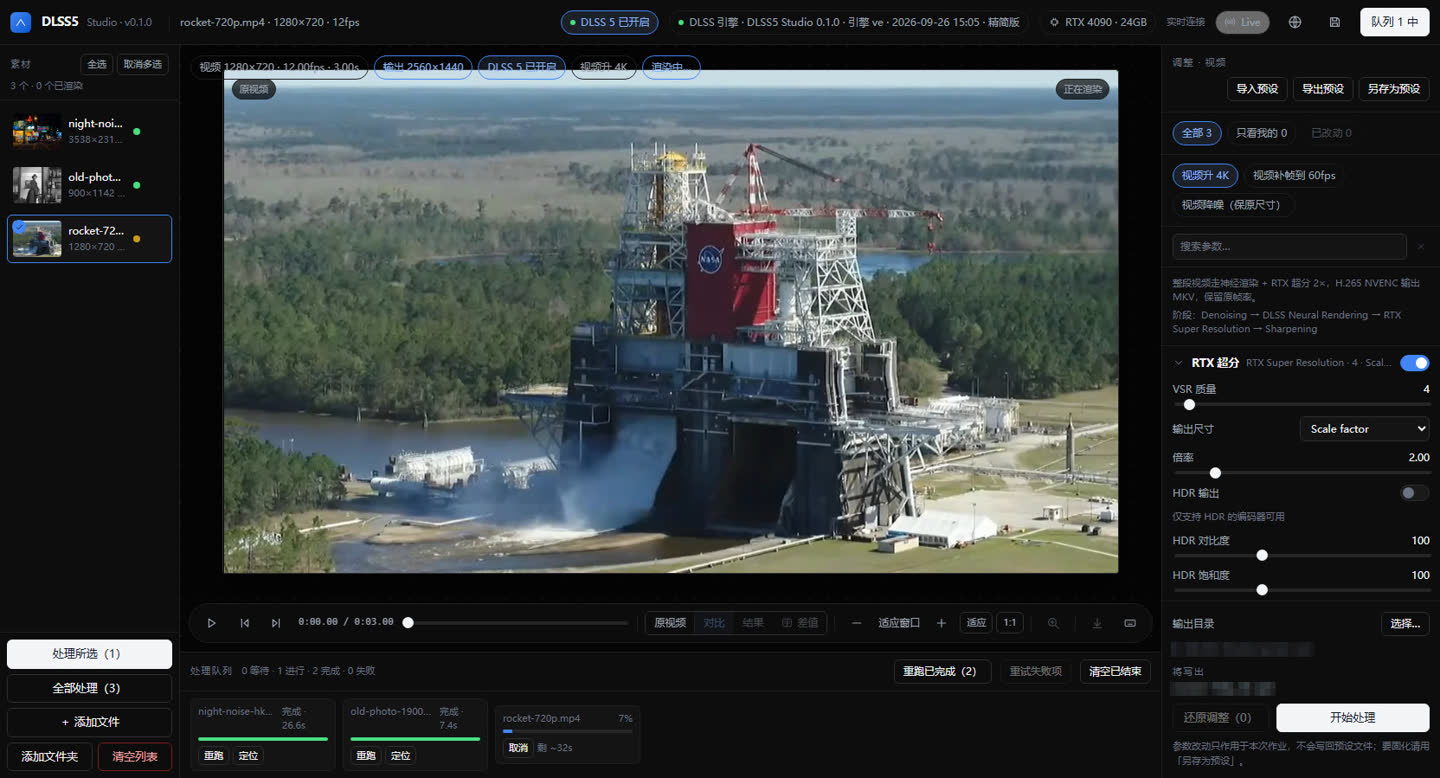
The 1280×720, 12fps, 3.00s clip produced 2560×1440 H.264 MP4 in 87.4s — 2.43s/frame. The paired queue capture shows 0 waiting · 1 in progress · 2 complete · 0 failed. The preset names H.265/NVENC, but this RTX 4090 driver 591.86 is below 610, so encoding correctly fell back to software H.264 MP4.
These six-second silent clips show independent visual references from the same site pipeline. They are not NVIDIA captures or a real-time performance claim.